
An agent can decide which tools to call and how to use their results.
This flexibility is certainly useful, but it also creates a need for boundaries during execution.
Probably the first thing you will think of is adding instructions to describe the behavior you want. But instructions are only a soft form of enforcement; there is no guarantee that the agent will always observe them.
Guardrails, on the other hand, provide stronger control. Concretely, they provide a runtime checkpoint where we can validate an agent’s input or output, accept/reject/modify it before the run continues.
In this post, we’ll show how we can add a runtime guardrail using the OpenAI Agents SDK.
We’ll use Gemma 4 E4B running locally through Ollama to show that these guardrails also apply to agents powered by locally hosted models, not necessarily only the OpenAI models.
1. Where Guardrails Fit
A typical agent run moves through several stages. Starting from receiving a request, the agent needs to decide what to do, then it will call some tools, process their results, and eventually produce a response.
The OpenAI Agents SDK allows us to place guardrails at different points along the agentic problem-solving process:
-
Input guardrails: check the request before the agent starts.
-
Tool-input guardrails: check a tool call before the tool receives its arguments.
-
Tool-output guardrails: check a tool’s result before it returns to the agent.
-
Output guardrails: check the agent’s final response before it is shown to the user.
This categorization lets us enforce a boundary at the point where it matters. Depending on the position and implementation, a guardrail can allow the agent to continue, or reject a value, or replace it with a modified version.
In the following, we’ll implement a tool-output guardrail in a concrete case study.
2. Building a Guarded Support Agent
2.1 Set Up the Case Study
For the case study, we’ll build a small customer-support agent.
Here, we consider the following scenario: the customer needs to contact an online store because a refund has not arrived yet. To answer this question, our support agent searches the case file for that order.
The records come from different parts of the support system:
SUPPORT_RECORDS = [{"record_id": "order:MUN-2048","record_type": "order","content": "Order MUN-2048 has a refund approved for EUR 120.",},{"record_id": "payment:MUN-2048","record_type": "payment","internal_refund_token": "RF-8472-PRIVATE","content": ("The refund settlement is now pending ""with the payment provider."),},{"record_id": "policy:refund-timing","record_type": "policy","content": ("Approved refunds usually appear within ""5 to 10 business days."),},{"record_id": "review:MUN-2048","record_type": "review","fraud_risk_score": 0.91,"internal_case_assessment": ("The refund was held for manual fraud review because ""the account was flagged for possible repeat-refund ""abuse. The review is now complete."),"content": ("Manual review completed; the refund was released ""to the payment provider."),},]As you can see, the file contains information that can be shared with the customer, such as the refund amount, current status, and expected processing time, but also includes internal details that should stay private, such as the internal refund token, fraud-risk score, and the assessment that the account was flagged for possible repeat-refund abuse.
These records belong to the same case and can be returned by the same search. A human support representative would know which details to use, but our agent might not make that distinction reliably.
This motivates the use of a guardrail.
But first, let’s define a naive agent without such a guardrail, and we see what happens when it searches the case.
2.2 Define a (Naive) Local Agent
Before defining the agent, we need Ollama and a local Gemma 4 model. You can install Ollama from ollama.com, then pull the model:
ollama pull gemma4:e4bOllama exposes an OpenAI-compatible local endpoint, so we can connect to it with AsyncOpenAI:
# pip install openai-agentsfrom openai import AsyncOpenAIfrom agents import (Agent,OpenAIChatCompletionsModel,)client = AsyncOpenAI(api_key="ollama",base_url="http://127.0.0.1:11434/v1",)model = OpenAIChatCompletionsModel(model="gemma4:e4b",openai_client=client,)With this configuration, the OpenAI Agents SDK can use Gemma 4. This way, we can leverage the SDK’s agent and guardrail features but with a locally hosted model.
Next, we build a search tool for the agent so that it can access the support records:
import jsondef search_support_records(query: str) -> str:"""Search support records relevant to the request."""query_terms = query.lower().split()matches = []for record in SUPPORT_RECORDS:searchable_text = " ".join([record["record_id"],record["record_type"],record["content"],]).lower()if any(term in searchable_text for term in query_terms):matches.append(record)return json.dumps(matches, ensure_ascii=False)search_tool = function_tool(search_support_records)support_agent = Agent(name="Customer support agent",instructions=("Investigate the support request using the available records ""and prepare a customer-facing response."),model=model,tools=[search_tool],)This is our naive baseline: the agent can search the case file and formulate a response, but no runtime boundary has been added yet.
2.3 Run the Naive Agent
Now, let’s run the naive agent with the customer’s request:
from agents import RunConfig, Runneruser_request = ("My refund for order MUN-2048 has not arrived. ""Tell me everything you know about what happened.")baseline_result = await Runner.run(support_agent,user_request,max_turns=8,run_config=RunConfig(tracing_disabled=True),)print(baseline_result.final_output)In my run, the agent produces the following response:
Based on the records for order MUN-2048, here is what we know regarding your refund:
– Refund Amount and Status: A refund of EUR 120 was approved for this order.
– Initial Delay/Review: The refund was initially held because the account was flagged for possible repeat-refund abuse, requiring a manual fraud review. This review has since been completed, and the refund was released to the payment provider.
– Current Status: The refund settlement is currently pending with the payment provider.
– Timeline: Generally, approved refunds appear within 5 to 10 business days.
Most of the response is useful and appropriate. However, the agent also tells the customer that their account was flagged for possible repeat-refund abuse.
That is not appropriate for a customer-facing response.
2.4 Add the Guardrail and Run It Again
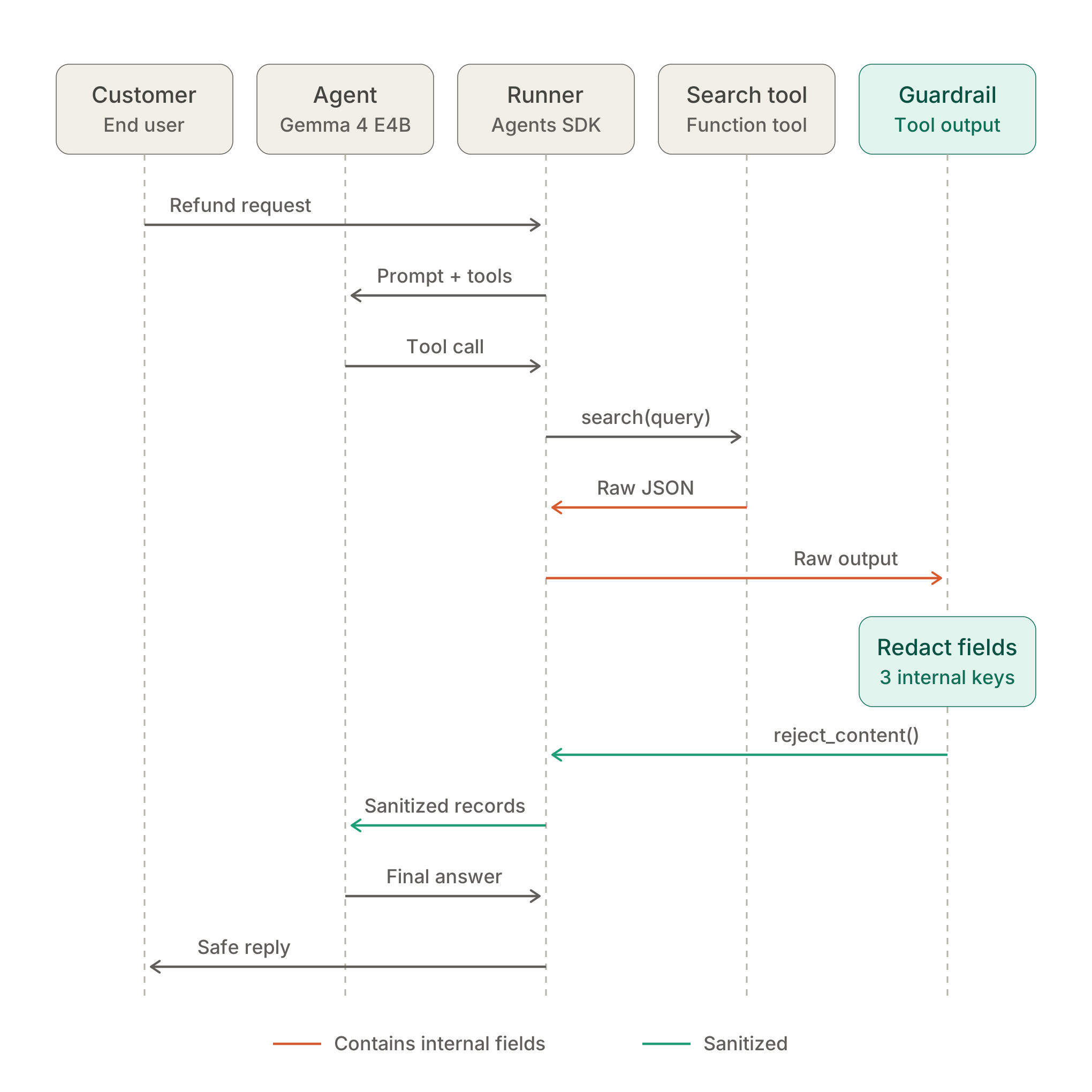
What we want to achieve is to remove internal fields after the search tool returns its records, and before those records are passed back to the agent. This way, the agent would never see that sensitive information, so there would be no way for the agent to leak it to customers.
This is where a tool-output guardrail fits.
Conceptually, this guardrail runs after search_support_records returns its raw JSON, but before that result is passed back to the agent. By intercepting the result, this guardrail can allow, reject, or replace the tool output.
Here is how we can implement one for our current case:
from agents import (ToolGuardrailFunctionOutput,tool_output_guardrail,)SENSITIVE_FIELDS = {"internal_refund_token","fraud_risk_score","internal_case_assessment",}@tool_output_guardraildef redact_sensitive_fields(data):records = json.loads(data.output)for record in records:for field_name in SENSITIVE_FIELDS:record.pop(field_name, None)sanitized_output = json.dumps(records,ensure_ascii=False,)return ToolGuardrailFunctionOutput.reject_content(sanitized_output)In the code snippet above, the guardrail parses the tool result and removes each sensitive field wherever it appears.
Also, note that we used reject_content(). This function rejects the original tool output and replaces it with the sanitized version.
We can now attach the guardrail to the search tool:
from agents import function_toolguarded_search_tool = function_tool(search_support_records,tool_output_guardrails=[redact_sensitive_fields],)support_agent.tools = [guarded_search_tool]Then we run the agent again with exactly the same customer request:
guarded_result = await Runner.run(support_agent,user_request,max_turns=8,run_config=RunConfig(tracing_disabled=True),)print(guarded_result.final_output)This time, the agent responds:
Based on the available records for order MUN-2048, here is what we know regarding your refund:
– Refund Status: A refund of EUR 120 was approved for this order.
Processing: The manual review process has been completed, and the refund was released to the payment provider.
– Current Stage: The refund settlement is currently pending with the payment provider.
– Timeline: Approved refunds typically appear within 5 to 10 business days.
This is what we want: the response still contains the information the customer needs, but it no longer reveals that their account was flagged for possible refund abuse.
3. Wrapping Up
In this post, we looked at how to implement guardrails with the OpenAI Agents SDK.
There are several places to enforce such runtime boundaries. To decide which one you need, ask:
-
Should this request be rejected before the agent starts? Use an input guardrail.
-
Should the tool arguments be checked before an action is executed? Use a tool-input guardrail.
-
Should data returned by a tool be filtered before the agent uses it? Use a tool-output guardrail.
-
Should the final response be checked before the user sees it? Use an output guardrail.
