Close Menu
AIToday7

    Subscribe to Updates

    Get the latest creative news from FooBar about art, design and business.

    What's Hot

    Brief independent investigation of agents’ behavior, reasoning and collaboration in the OpenAI / Hugging Face hacking incident

    August 27, 2026

    Fake US thinktank set up and funded by Israel sought to game AI for propaganda

    August 27, 2026

    Medical Readiness Command, Europe G-6 Information Technology Team wins 2026 MEDCOM Mercury Award for HIT Team of the Year

    August 27, 2026
    Facebook X (Twitter) Instagram
    Trending
    • Brief independent investigation of agents’ behavior, reasoning and collaboration in the OpenAI / Hugging Face hacking incident
    • Fake US thinktank set up and funded by Israel sought to game AI for propaganda
    • Medical Readiness Command, Europe G-6 Information Technology Team wins 2026 MEDCOM Mercury Award for HIT Team of the Year
    • Corgi built its name insuring AI startups. Its new carrier targets dry cleaners, salons and more
    • 5 Of The Best UGREEN Gadgets You Can Buy In 2026
    • Three UK airports hit by cyber-attack with data of 8.7m customers accessed
    • How to advertise on ChatGPT: A step-by
    • The Data Center Backlash Is a Rare Bright Spot in American Politics
    Facebook X (Twitter) Instagram Pinterest Vimeo
    AIToday7
    • Home
    • AI News
    • Tech News
    • AI Guides
    • Chatbots
    • Cybersecurity
    • Gadgets
    • More
      • Generative AI
      • Startups
    AIToday7
    Home»Chatbots»Hidden prompt turns Microsoft Copilot into an AI worm
    Chatbots

    Hidden prompt turns Microsoft Copilot into an AI worm

    aitoday7By aitoday7July 31, 2026No Comments3 Mins Read
    Share Facebook Twitter Pinterest LinkedIn Tumblr Reddit Telegram Email
    Hidden prompt turns Microsoft Copilot into an AI worm
    Share
    Facebook Twitter LinkedIn Pinterest Email

    A security researcher has demonstrated how Microsoft Copilot for Word can be tricked into spreading a self‑propagating prompt‑injection “AI worm.” The attack silently alters documents and embeds its own hidden instructions into newly created files, allowing it to spread through normal document-sharing workflows without macros or traditional malware.

    The technique allows an attacker to hide a JSON‑formatted prompt as white text on a white background inside a Word document. When someone asks Copilot for Word to draft or edit content based on that document, Copilot strips away the formatting, reads the hidden text, and treats the embedded instructions as part of the user’s request.

    Copilot then modifies the active document and appends the full malicious prompt as hidden white text. That new document becomes a new carrier. Anyone who later uses it ase prompt injection to spread to more documents. Because the documents are created and edited by legitimate users, the attack can be difficult to trace

    The researcher could still reproduce the full worm chain even after Microsoft rolled out multiple mitigations, including upgrades to newer GPT‑5.5 and 5.6 models.

    At the time of writing, there is no complete mitigation for this broader class of attacks across comparable large language model (LLM)‑based products. It’s characterized as an architectural weakness of current LLM systems: attacker‑controlled content shares the same context window as trusted instructions. Attacks that exploit this behavior are known as prompt injection attacks and may never be fixed.

    How to stay safe

    Treat documents from outside your organization as untrusted, especially if you plan to use them with Copilot for Word.

    Review any attached document before using it as Copilotments before sharing or reusing them

    If you don’t use Copilot, you can disable it.

    Malwarebytes users can turn off Copilot under Tools > System Tweaks > Miscellaneous.
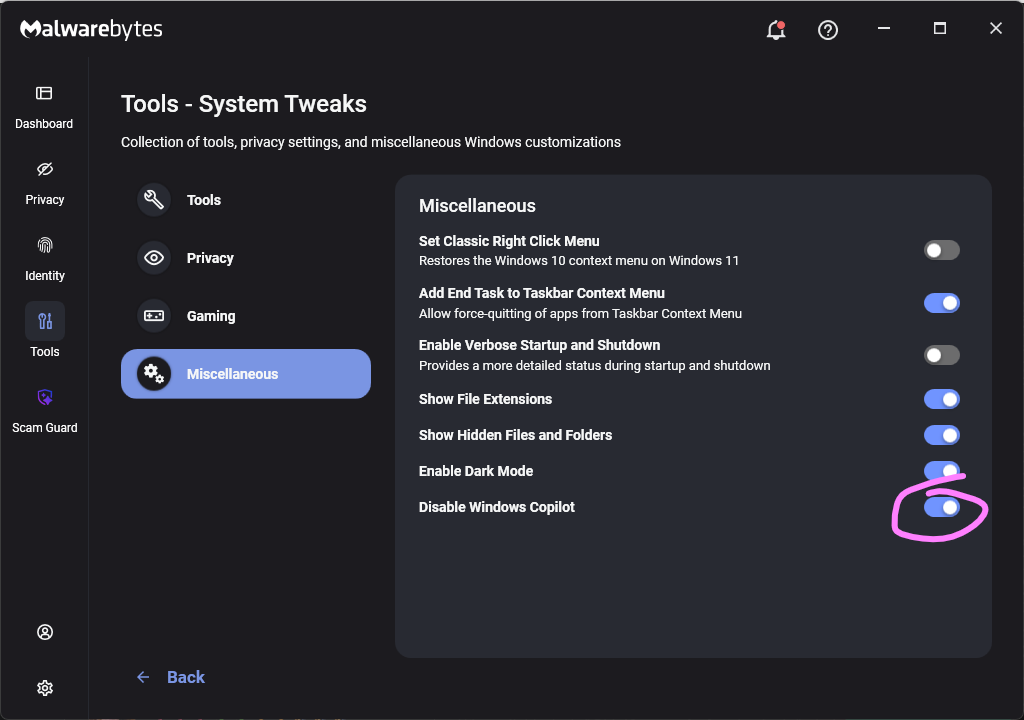
    Malwarebytes setting to disable Copilot
    Malwarebytes setting to disable Copilot

    For individual users who don’t want Copilot in Word:

    • Open Word, go to File>Options> Copilot and clear the Enable Copilot checkbox, then restart Word.
      uncheck Enable Copilot in Word
    • In some versions of Word, the setting appears under File > Options > General in a Copilot section. In both cases, the key is unchecking the “Enable Copilot” setting.

    You can also remove the Copilot icon from the ribbon by right‑clicking the ribbon, open the customization dialog, locate the Copilot/Assistance button, and removing it.

    Alternatively, you can limit Copilot’s role by following these instructions:

    • In Word, go to File>Account>Account Privacy>Manage Settings, and uncheck Turn on optional connected experiences. This reduces certain cloud‑powered AI features, including Copilot‑related functions that rely on those services.
    • In the Microsoft 365 Admin Center, under Copilot>Settings, set Pin Microsoft 365 Copilot Chat to Do not pin Copilot chat in Microsoft 365 apps so the chat pane doesn’t appear by default in apps like Word.

    This doesn’t remove Copilot entirely or stop these attacks, but it does reduce its visibility and limits some of its cloud‑assisted functionality.

    From reporting threats to removing them.

    Cybersecurity risks should never spread beyond a headline. Keep threats off your devices by downloading Malwarebytes today.

    Post Views: 4

    Copilot hidden Microsoft prompt turns
    Share. Facebook Twitter Pinterest LinkedIn Tumblr Email
    Previous ArticleAnthropic’s Claude AI escapes tests to hack three organisations
    Next Article Anthropic says Claude AI hacked three companies during cyber tests
    aitoday7
    • Website

    Related Posts

    Chatbots

    Fake US thinktank set up and funded by Israel sought to game AI for propaganda

    August 27, 2026
    Chatbots

    Enabling independent research on how people use Claude

    August 27, 2026
    Chatbots

    Americans Want to Know When Their Healthcare Providers Use AI

    August 26, 2026
    Add A Comment
    Leave A Reply Cancel Reply

    Top Posts

    Brief independent investigation of agents’ behavior, reasoning and collaboration in the OpenAI / Hugging Face hacking incident

    August 27, 20260 Views

    Fake US thinktank set up and funded by Israel sought to game AI for propaganda

    August 27, 20260 Views

    Medical Readiness Command, Europe G-6 Information Technology Team wins 2026 MEDCOM Mercury Award for HIT Team of the Year

    August 27, 20260 Views
    Stay In Touch
    • Facebook
    • YouTube
    • TikTok
    • WhatsApp
    • Twitter
    • Instagram
    Latest Reviews
    Chatbots

    OpenAI bets on families as ChatGPT goes deeper into households

    aitoday7July 11, 2026
    Generative AI

    MUSIC COMMUNITY INTRODUCES NEW LABELING PROGRAM TO DISTINGUISH GENERATIVE AI IN SOUND RECORDINGS

    aitoday7July 11, 2026
    AI News

    Safe from AI: which jobs will help you thrive in the future?

    aitoday7July 11, 2026

    Subscribe to Updates

    Get the latest tech news from FooBar about tech, design and biz.

    Most Popular

    Brief independent investigation of agents’ behavior, reasoning and collaboration in the OpenAI / Hugging Face hacking incident

    August 27, 20260 Views

    Fake US thinktank set up and funded by Israel sought to game AI for propaganda

    August 27, 20260 Views

    Medical Readiness Command, Europe G-6 Information Technology Team wins 2026 MEDCOM Mercury Award for HIT Team of the Year

    August 27, 20260 Views
    Our Picks

    OpenAI bets on families as ChatGPT goes deeper into households

    July 11, 2026

    MUSIC COMMUNITY INTRODUCES NEW LABELING PROGRAM TO DISTINGUISH GENERATIVE AI IN SOUND RECORDINGS

    July 11, 2026

    Safe from AI: which jobs will help you thrive in the future?

    July 11, 2026

    Subscribe to Updates

    Get the latest creative news from FooBar about art, design and business.

    Facebook X (Twitter) Instagram Pinterest
    • About Us
    • Get In Touch
    • Disclaimer
    • Privacy Policy
    • Terms and Conditions
    © 2026 AIToday7. All Rights Reserved.

    Type above and press Enter to search. Press Esc to cancel.